iOS Live Activities Widget Complete Guide: FocusFlow Part 2
Real-time session tracking with Dynamic Island, Lock Screen integration, and Live Activity management
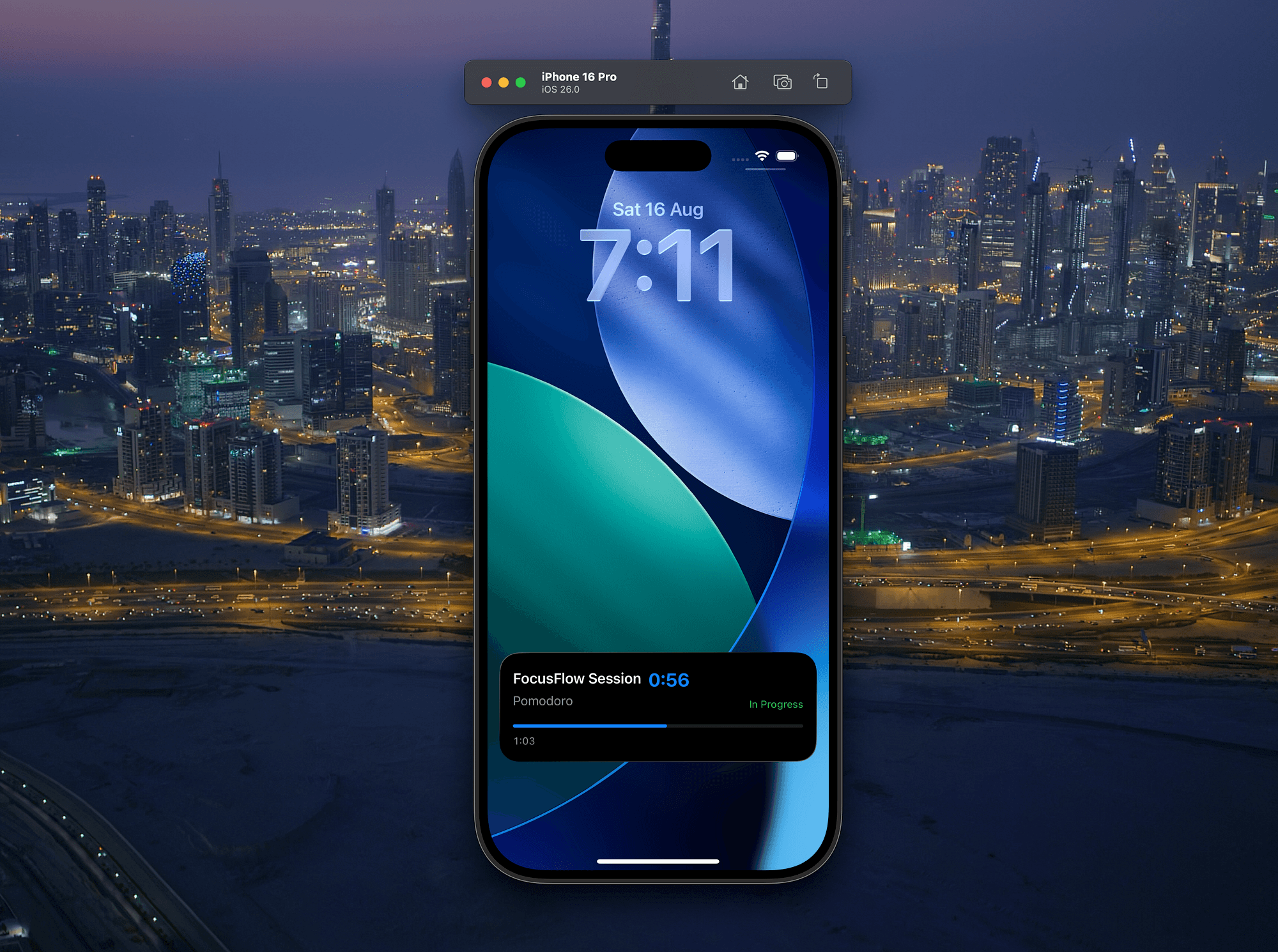

In Part 1, we built the foundation of FocusFlow with basic widgets that show daily focus time and streaks. Now we’re going to add the really exciting stuff: Live Activities that track your focus sessions in real-time.
If you haven’t read Part 1, go back and build the foundation first. This article assumes you have the basic FocusFlow app with widgets already working.
**How to Build Your First iOS Widget with SwiftUI: FocusFlow Part 1** _Building widget fundamentals with timeline providers, App Groups, and responsive layouts_swift-pal.comhttps://swift-pal.com/how-to-build-your-first-ios-widget-with-swiftui-focusflow-part-1-baf13a21f69e
📺 Following along? The complete video walkthrough will be available on Swift Pal: https://youtube.com/@swift-pal
**Swift Pal** _👨💻 Welcome to Swift Pal - Your iOS Dev Companion! Whether you're just starting your journey with Swift and SwiftUI…_youtube.comhttps://youtube.com/@swift-pal
🎯 What We’re Adding
Live Activities for FocusFlow will:
- Start when users begin a focus session
- Show real-time countdown in Dynamic Island
- Display session progress on Lock Screen
- Handle session completion and breaks
- Work seamlessly with our existing widgets
🚀 Understanding Live Activities
Before we dive into code, let’s understand what Live Activities actually are and how they work fundamentally.
What Are Live Activities?
Live Activities are persistent, real-time notifications that display ongoing events directly on your Lock Screen and Dynamic Island. Think of them as “living widgets” that update automatically without user interaction.
Key characteristics:
- Persistent: Stay visible until the event ends (unlike regular notifications)
- Real-time: Update automatically every second for certain UI elements
- Interactive: Can include buttons for quick actions
- System-managed: iOS controls their lifecycle and display
Where Live Activities Appear
Live Activities live in two places:
- Dynamic Island (iPhone 14 Pro and later): Compact, always-visible pill that expands when touched
- Lock Screen: Full-width card below the time, with more space for details
Live Activity Architecture
Live Activities follow a specific architecture pattern:
Your App                    ActivityKit                 System UI
┌─────────────┐            ┌─────────────┐            ┌─────────────┐
│             │            │             │            │             │
│ Request()   │ ---------> │ Activity    │ ---------> │ Lock Screen │
│ Update()    │            │ Management  │            │ Dynamic     │
│ End()       │            │             │            │ Island      │
│             │            │             │            │             │
└─────────────┘            └─────────────┘            └─────────────┘
Live Activity Lifecycle
Every Live Activity follows this lifecycle:
- Request: Your app requests a new Live Activity with initial data
- Active: The activity is displayed and can receive updates
- Update: Your app pushes new data to update the UI (optional, multiple times)
- End: The activity is dismissed (manually or automatically)
- Cleanup: iOS removes it from Lock Screen/Dynamic Island
Data Flow Model
Live Activities use a unique data architecture:
Static Data (Attributes): Set once when requesting, never changes
- Session type, user preferences, static configuration
Dynamic Data (ContentState): Updates during the activity’s lifetime
- Progress percentage, time remaining, current status
// Static - never changes during the activity
struct FocusSessionAttributes: ActivityAttributes {
    // Empty in our case - we put everything in ContentState
}

// Dynamic - updates as session progresses
struct ContentState: Codable, Hashable {
    let session: FocusSession      // Session details
    let progress: Double           // 0.0 to 1.0
    let timeRemaining: TimeInterval // Seconds left
    let isCompleted: Bool          // Session status
}
Update Mechanisms
Live Activities can update in three ways:
- App Updates (what we’ll use): Your app pushes updates via
activity.update() - Push Notifications: Server-sent updates for remote events
- Timer-based Views: Special SwiftUI views that auto-update every second
Timer-Aware Views (Critical!)
This is where Live Activities get special powers. Only certain SwiftUI views automatically update:
✅ Auto-updating views:
Text(date, style: .timer)- Live countdownText(timerInterval: start...end, countsDown: true)- Live countdownProgressView(timerInterval: start...end)- Live progress bar
❌ Static views (freeze at initial value):
Text("\(percentage)%")- Shows initial percentage foreverText(timeRemaining.formatted())- Shows initial time forever- Custom calculated values — All freeze at request time
Performance & Battery Considerations
Live Activities are designed to be battery-efficient:
- System-managed updates: iOS controls when and how often they refresh
- Efficient UI: Only timer-aware views update automatically
- App-driven updates: Your app only pushes data when something meaningful changes
- Automatic cleanup: iOS removes stale activities
Permissions & Limitations
- User permission required: Users can disable Live Activities globally
- Time limits: Activities auto-dismiss after 8 hours (configurable)
- Update frequency: Limit app-driven updates to preserve battery
- Content restrictions: No videos, complex animations, or heavy content
Now that we understand the foundation, let’s build our focus session Live Activity!
📊 Setting Up Activity Framework
First, we need to add the ActivityKit framework to our project.
Add ActivityKit to your main app and widget target:
- Select your target
- Build Phases → Link Binary With Libraries → + → ActivityKit.framework
- Repeat to add in the next target.
Update your **FocusData.swift** to support Live Activities (ADD TO BOTH app + widget targets):
Why BOTH? The widget (timeline + Live Activity UI) must read the same state (todaysFocusTime, active session) that the app mutates. One shared file prevents divergence.
import Foundation
import ActivityKit
import Observation

// Notification for session completion
extension Notification.Name {
    static let sessionCompleted = Notification.Name("sessionCompleted")
}
@Observable
class FocusData {
    static let shared = FocusData()

    var todaysFocusTime: TimeInterval = 0
    var currentStreak: Int = 0
    var lastSessionDate: Date?

    // Live Activity support
    var currentSession: FocusSession?
    var isSessionActive: Bool = false

    private let userDefaults = UserDefaults(suiteName: "group.com.yourname.focusflow")
    private let focusTimeKey = "todaysFocusTime"
    private let streakKey = "currentStreak"
    private let lastSessionKey = "lastSessionDate"
    private let lastResetDateKey = "lastResetDate"
    // Session snapshot keys (used by widget timeline & Live Activity awareness)
    private let isSessionActiveKey = "ff_isSessionActive"
    private let sessionRemainingKey = "ff_sessionRemaining"
    private let sessionTypeKey = "ff_sessionType"
    private let sessionStartTimeKey = "ff_sessionStartTime"
    private let sessionTargetDurationKey = "ff_sessionTargetDuration"
    private let sessionIdKey = "ff_sessionId"

    private init() {
        loadData()
        checkForNewDay()
    }

    func startFocusSession(duration: TimeInterval, sessionType: String = "Deep Work") {
        let session = FocusSession(
            id: UUID(),
            startTime: Date(),
            targetDuration: duration,
            sessionType: sessionType
        )

        currentSession = session
        isSessionActive = true
        // Persist snapshot for widget provider
        persistSessionSnapshot(active: true, remaining: session.targetDuration, type: session.sessionType)

        // Start Live Activity
        Task {
            await startLiveActivity(for: session)
        }
    }

    func completeFocusSession() {
        guard let session = currentSession else { return }

        let actualDuration = Date().timeIntervalSince(session.startTime)
        addFocusSession(duration: actualDuration)

        currentSession = nil
        isSessionActive = false
        // Clear snapshot for widget provider
        persistSessionSnapshot(active: false)

        // End Live Activity
        Task {
            await endLiveActivity(completed: true)
        }
    }

    func cancelFocusSession() {
        currentSession = nil
        isSessionActive = false
        // Clear snapshot for widget provider
        persistSessionSnapshot(active: false)

        // End Live Activity
        Task {
            await endLiveActivity(completed: false)
        }
    }

    func addFocusSession(duration: TimeInterval) {
        todaysFocusTime += duration
        updateStreak()
        lastSessionDate = Date()
        saveData()
    }

    private func updateStreak() {
        let calendar = Calendar.current
        let today = Date()

        if let lastSession = lastSessionDate {
            let daysSinceLastSession = calendar.dateComponents([.day], from: lastSession, to: today).day ?? 0

            if daysSinceLastSession == 0 {
                return
            } else if daysSinceLastSession == 1 {
                currentStreak += 1
            } else {
                currentStreak = 1
            }
        } else {
            currentStreak = 1
        }
    }

    private func checkForNewDay() {
        let calendar = Calendar.current
        let today = Date()

        if let lastReset = userDefaults?.object(forKey: lastResetDateKey) as? Date {
            if !calendar.isDate(lastReset, inSameDayAs: today) {
                resetDay()
                userDefaults?.set(today, forKey: lastResetDateKey)
            }
        } else {
            userDefaults?.set(today, forKey: lastResetDateKey)
        }
    }

    func resetDay() {
        todaysFocusTime = 0
        saveData()
    }

    private func loadData() {
        todaysFocusTime = userDefaults?.double(forKey: focusTimeKey) ?? 0
        currentStreak = userDefaults?.integer(forKey: streakKey) ?? 0
        lastSessionDate = userDefaults?.object(forKey: lastSessionKey) as? Date

        // Restore active session if it exists
        isSessionActive = userDefaults?.bool(forKey: isSessionActiveKey) ?? false
        if isSessionActive {
            restoreActiveSession()
        }
    }

    private func restoreActiveSession() {
        guard let startTime = userDefaults?.object(forKey: sessionStartTimeKey) as? Date,
              let sessionType = userDefaults?.string(forKey: sessionTypeKey),
              let sessionIdString = userDefaults?.string(forKey: sessionIdKey),
              let sessionId = UUID(uuidString: sessionIdString) else {
            // Invalid session data, clear it
            isSessionActive = false
            persistSessionSnapshot(active: false)
            return
        }

        let targetDuration = userDefaults?.double(forKey: sessionTargetDurationKey) ?? 0
        let elapsed = Date().timeIntervalSince(startTime)

        // Check if session should have already completed
        if elapsed >= targetDuration {
            // Session expired while app was closed, complete it
            let expiredSession = FocusSession(
                id: sessionId,
                startTime: startTime,
                targetDuration: targetDuration,
                sessionType: sessionType
            )
            currentSession = expiredSession
            completeFocusSession()
        } else {
            // Session is still active, restore it
            currentSession = FocusSession(
                id: sessionId,
                startTime: startTime,
                targetDuration: targetDuration,
                sessionType: sessionType
            )
        }
    }

    private func saveData() {
        userDefaults?.set(todaysFocusTime, forKey: focusTimeKey)
        userDefaults?.set(currentStreak, forKey: streakKey)
        userDefaults?.set(lastSessionDate, forKey: lastSessionKey)
    }

    // Persist complete session data for restoration after app restart
    private func persistSessionSnapshot(active: Bool, remaining: TimeInterval? = nil, type: String? = nil) {
        userDefaults?.set(active, forKey: isSessionActiveKey)
        userDefaults?.set(remaining, forKey: sessionRemainingKey)
        userDefaults?.set(type, forKey: sessionTypeKey)

        if active, let session = currentSession {
            // Save complete session data for restoration
            userDefaults?.set(session.startTime, forKey: sessionStartTimeKey)
            userDefaults?.set(session.targetDuration, forKey: sessionTargetDurationKey)
            userDefaults?.set(session.id.uuidString, forKey: sessionIdKey)
        } else {
            // Clear session data when not active
            userDefaults?.removeObject(forKey: sessionStartTimeKey)
            userDefaults?.removeObject(forKey: sessionTargetDurationKey)
            userDefaults?.removeObject(forKey: sessionIdKey)
        }
    }
}
// MARK: - Live Activity Management
extension FocusData {
    @MainActor
    private func startLiveActivity(for session: FocusSession) async {
        let attributes = FocusSessionAttributes()
        let initialState = FocusSessionAttributes.ContentState(
            session: session,
            progress: 0.0,
            timeRemaining: session.targetDuration
        )

        do {
            // iOS 16.2+ API: use content: ActivityContent instead of deprecated contentState:
            let content = ActivityContent(state: initialState, staleDate: nil)
            let activity = try Activity<FocusSessionAttributes>.request(
                attributes: attributes,
                content: content,
                pushType: nil
            )
            print("Started Live Activity: \(activity.id)")
        } catch {
            print("Failed to start Live Activity: \(error)")
        }
    }

    @MainActor
    private func endLiveActivity(completed: Bool) async {
        for activity in Activity<FocusSessionAttributes>.activities {
            let finalState = FocusSessionAttributes.ContentState(
                session: activity.content.state.session,
                progress: completed ? 1.0 : activity.content.state.progress,
                timeRemaining: completed ? 0 : activity.content.state.timeRemaining,
                isCompleted: completed
            )

            await activity.end(
                ActivityContent(state: finalState, staleDate: nil),
                dismissalPolicy: .immediate
            )
        }
    }

    func updateLiveActivityProgress() {
        guard let session = currentSession else { return }

        let elapsed = Date().timeIntervalSince(session.startTime)
        let progress = min(elapsed / session.targetDuration, 1.0)
        let remaining = max(session.targetDuration - elapsed, 0)
        // Persist updated remaining time for widget provider countdown
        persistSessionSnapshot(active: true, remaining: remaining, type: session.sessionType)

        Task { @MainActor in
            for activity in Activity<FocusSessionAttributes>.activities {
                let updatedState = FocusSessionAttributes.ContentState(
                    session: session,
                    progress: progress,
                    timeRemaining: remaining
                )

                await activity.update(
                    ActivityContent(state: updatedState, staleDate: nil)
                )
            }
        }
    }
}
// Helper models
// Declare Codable & Hashable here so synthesis works (ActivityKit needs it)
struct FocusSession: Codable, Hashable {
    let id: UUID
    let startTime: Date
    let targetDuration: TimeInterval
    let sessionType: String
}
extension TimeInterval {
    var formattedDuration: String {
        let hours = Int(self) / 3600
        let minutes = Int(self) % 3600 / 60

        if hours > 0 {
            return "\(hours)h \(minutes)m"
        } else {
            return "\(minutes)m"
        }
    }

    var formattedCountdown: String {
        let minutes = Int(self) / 60
        let seconds = Int(self) % 60
        return String(format: "%02d:%02d", minutes, seconds)
    }
}
IMPORTANT: Remove any duplicateTimeIntervalformatting extension (for example one still living inFocusFlowWidget.swiftfrom Part 1). Additionally, you can keep a single sharedTimeInterval+Formatting.swiftfile added to BOTH targets to avoidInvalid redeclarationcompiler errors.
🏗️ Activity Attributes and Content State
Live Activities need two key components: Attributes (static data) and ContentState (dynamic data that changes).
Create **FocusSessionActivity.swift** (ADD TO BOTH app + widget targets):
The app requests/updates/ends the Live Activity; the widget renders it. Missing target membership on either side causes build errors or a non‑rendering activity.
import ActivityKit
import Foundation

struct FocusSessionAttributes: ActivityAttributes {
    public typealias FocusSessionStatus = ContentState

    public struct ContentState: Codable, Hashable {
        let session: FocusSession
        let progress: Double
        let timeRemaining: TimeInterval
        let isCompleted: Bool

        init(session: FocusSession,
             progress: Double,
             timeRemaining: TimeInterval,
             isCompleted: Bool = false) {
            self.session = session
            self.progress = progress
            self.timeRemaining = timeRemaining
            self.isCompleted = isCompleted
        }
    }
}
🎨 Creating Live Activity Views
Now comes the fun part — designing the Live Activity UI. We need both Dynamic Island and Lock Screen views.
Add these views in your Widget Extension target:
import SwiftUI
import ActivityKit
import WidgetKit

struct FocusSessionLiveActivity: Widget {
    var body: some WidgetConfiguration {
        ActivityConfiguration(for: FocusSessionAttributes.self) { context in
            // Lock Screen view
            FocusSessionLockScreenView(context: context)
        } dynamicIsland: { context in
            DynamicIsland {
                // Expanded view
                DynamicIslandExpandedRegion(.leading) {
                    // Use timer interval for precise countdown that stops at 00:00
                    let start = context.state.session.startTime
                    let end = start.addingTimeInterval(context.state.session.targetDuration)
                    VStack(alignment: .leading, spacing: 2) {
                        Text(context.state.session.sessionType)
                            .font(.caption)
                            .foregroundColor(.secondary)
                        Text(timerInterval: start...end, countsDown: true)
                            .font(.headline)
                            .fontWeight(.semibold)
                            .monospacedDigit()
                    }
                }

                DynamicIslandExpandedRegion(.trailing) {
                    VStack(spacing: 2) {
                        Image(systemName: "brain.head.profile")
                            .font(.title2)
                            .foregroundColor(.blue)

                        Text("Active")
                            .font(.caption)
                            .foregroundColor(.green)
                    }
                }

                DynamicIslandExpandedRegion(.bottom) {
                    let end = context.state.session.startTime.addingTimeInterval(context.state.session.targetDuration)
                    ProgressView(timerInterval: context.state.session.startTime...end, countsDown: false)
                        .progressViewStyle(LinearProgressViewStyle(tint: .blue))
                }
            } compactLeading: {
                Image(systemName: "brain.head.profile")
                    .foregroundColor(.blue)
            } compactTrailing: {
                let start = context.state.session.startTime
                let end = start.addingTimeInterval(context.state.session.targetDuration)
                Text(timerInterval: start...end, countsDown: true)
                    .font(.caption2)
                    .fontWeight(.semibold)
            } minimal: {
                Image(systemName: "brain.head.profile")
                    .foregroundColor(.blue)
            }
        }
    }
}

struct FocusSessionLockScreenView: View {
    let context: ActivityViewContext<FocusSessionAttributes>

    var body: some View {
        VStack(spacing: 12) {
            HStack {
                VStack(alignment: .leading, spacing: 4) {
                    Text("FocusFlow Session")
                        .font(.headline)
                        .foregroundColor(.primary)

                    Text(context.state.session.sessionType)
                        .font(.subheadline)
                        .foregroundColor(.secondary)
                }

                Spacer()

                VStack(alignment: .trailing, spacing: 4) {
                    let end = context.state.session.startTime.addingTimeInterval(context.state.session.targetDuration)
                    Text(end, style: .timer)
                        .font(.title2)
                        .fontWeight(.bold)
                        .foregroundColor(.blue)

                    Text("In Progress")
                        .font(.caption)
                        .foregroundColor(.green)
                }
            }

            let end = context.state.session.startTime.addingTimeInterval(context.state.session.targetDuration)
            ProgressView(timerInterval: context.state.session.startTime...end, countsDown: false)
                .progressViewStyle(LinearProgressViewStyle(tint: .blue))

            if context.state.isCompleted {
                HStack {
                    Image(systemName: "checkmark.circle.fill")
                        .foregroundColor(.green)
                    Text("Focus session completed!")
                        .font(.subheadline)
                        .foregroundColor(.green)
                }
            }
        }
        .padding()
        .background(Color(.systemBackground))
    }
}
Live Activity Timer Views: Live Activities severely restrict UI updates. Only few of the time aware UI elements likeText(date, style: .timer)andProgressView(timerInterval:countsDown:)auto-update every second. Regular Text views showing percentages or other calculated values remain frozen at their initial state. The timer above only handles completion detection and widget updates - it doesn't affect Live Activity UI.
🔄 Real-Time Updates
Live Activities need regular updates to show progress. Let’s add a timer system to our main app.
Update your **ContentView.swift**:
import SwiftUI

struct ContentView: View {
    @State private var focusData = FocusData.shared
    // Replaces simple Timer with an async Task loop for reliable second ticks
    @State private var sessionTickerTask: Task<Void, Never>? = nil

    var body: some View {
        NavigationView {
            VStack(spacing: 30) {
                // Today's Stats
                VStack(spacing: 16) {
                    Text("Today's Focus Time")
                        .font(.headline)
                        .foregroundColor(.secondary)

                    Text(focusData.todaysFocusTime.formattedDuration)
                        .font(.largeTitle)
                        .fontWeight(.bold)
                        .foregroundColor(.blue)

                    HStack(spacing: 20) {
                        VStack {
                            Text("\(focusData.currentStreak)")
                                .font(.title2)
                                .fontWeight(.bold)
                                .foregroundColor(.orange)
                            Text("Day Streak")
                                .font(.caption)
                                .foregroundColor(.secondary)
                        }

                        Divider()
                            .frame(height: 40)

                        VStack {
                            Text("25m")
                                .font(.title2)
                                .fontWeight(.bold)
                                .foregroundColor(.green)
                            Text("Next Session")
                                .font(.caption)
                                .foregroundColor(.secondary)
                        }
                    }
                }
                .padding()
                .background(Color(.systemGray6))
                .clipShape(RoundedRectangle(cornerRadius: 12))

                // Current Session Status
                if focusData.isSessionActive, let session = focusData.currentSession {
                    CurrentSessionView(session: session)
                }

                Spacer()

                // Session Controls
                VStack(spacing: 16) {
                    Text("Quick Focus Session")
                        .font(.headline)

                    if !focusData.isSessionActive {
                        HStack(spacing: 12) {
                            SessionButton(title: "25m", subtitle: "Pomodoro", duration: 25 * 60) {
                                startSessionTimer()
                            }
                            SessionButton(title: "45m", subtitle: "Deep Work", duration: 45 * 60) {
                                startSessionTimer()
                            }
                            SessionButton(title: "90m", subtitle: "Flow State", duration: 90 * 60) {
                                startSessionTimer()
                            }
                        }
                    } else {
                        HStack(spacing: 16) {
                            Button("Complete Session") {
                                focusData.completeFocusSession()
                                stopSessionTimer()
                            }
                            .buttonStyle(.borderedProminent)

                            Button("Cancel") {
                                focusData.cancelFocusSession()
                                stopSessionTimer()
                            }
                            .buttonStyle(.bordered)
                        }
                    }
                }

                Spacer()
            }
            .padding()
            .navigationTitle("FocusFlow")
            .onAppear {
                // Start timer if session was restored from UserDefaults
                if focusData.isSessionActive {
                    startSessionTimer()
                }
            }
        }
    }

    private func startSessionTimer() {
        sessionTickerTask?.cancel()
        sessionTickerTask = Task { [weak focusData] in
            while let data = focusData, data.isSessionActive {
                // Only for completion detection and widget updates - NOT for Live Activity UI
                let session = data.currentSession!
                let elapsed = Date().timeIntervalSince(session.startTime)
                let remaining = session.targetDuration - elapsed
                let isComplete = elapsed >= session.targetDuration

                if isComplete {
                    await MainActor.run {
                        data.completeFocusSession()
                        // Force UI update when app is in foreground
                        NotificationCenter.default.post(name: .sessionCompleted, object: nil)
                    }
                    break
                }

                // Update widget timeline (separate from Live Activity)
                await MainActor.run { data.updateLiveActivityProgress() }

                // Check more frequently as we approach completion
                let checkInterval: Duration = remaining < 10 ? .seconds(1) : .seconds(5)
                try? await Task.sleep(for: checkInterval)
            }
        }
    }

    private func stopSessionTimer() {
        sessionTickerTask?.cancel()
        sessionTickerTask = nil
    }
}

struct SessionButton: View {
    let title: String
    let subtitle: String
    let duration: TimeInterval
    let onSessionStart: () -> Void

    var body: some View {
        Button {
            FocusData.shared.startFocusSession(duration: duration, sessionType: subtitle)
            onSessionStart()
        } label: {
            VStack(spacing: 4) {
                Text(title)
                    .font(.title2)
                    .fontWeight(.bold)
                Text(subtitle)
                    .font(.caption)
            }
            .frame(maxWidth: .infinity)
            .padding()
            .background(Color.blue)
            .foregroundColor(.white)
            .clipShape(RoundedRectangle(cornerRadius: 8))
        }
    }
}

struct CurrentSessionView: View {
    let session: FocusSession
    @State private var now = Date()
    private let ticker = Timer.publish(every: 1, on: .main, in: .common).autoconnect()

    var body: some View {
        VStack(spacing: 12) {
            Text("Current Session")
                .font(.headline)
                .foregroundColor(.secondary)

            Text(session.sessionType)
                .font(.title2)
                .fontWeight(.semibold)

            let elapsed = now.timeIntervalSince(session.startTime)
            let remaining = max(session.targetDuration - elapsed, 0)

            Text(remaining.formattedCountdown)
                .font(.largeTitle)
                .fontWeight(.bold)
                .foregroundColor(.blue)
                .monospacedDigit()

            ProgressView(value: elapsed / session.targetDuration)
                .progressViewStyle(LinearProgressViewStyle(tint: .blue))
        }
        .onReceive(ticker) { now = $0 }
        .padding()
        .background(Color(.systemGray6))
        .clipShape(RoundedRectangle(cornerRadius: 12))
    }
}
📱 Widget Extension Updates
Your existing widgets from Part 1 remain unchanged. The only update needed is adding the Live Activity to your widget bundle.
Update your Widget Bundle to include the Live Activity:
import WidgetKit
import SwiftUI

@main
struct FocusFlowWidgetBundle: WidgetBundle {
    var body: some Widget {
        FocusFlowWidget()           // Your existing widget from Part 1
        FocusSessionLiveActivity()  // New Live Activity
    }
}
Update **FocusProvider** to focus on core metrics:
struct FocusProvider: TimelineProvider {
    func placeholder(in context: Context) -> FocusEntry {
        FocusEntry(date: Date(), todaysFocusTime: 25*60, currentStreak: 3)
    }

    func getSnapshot(in context: Context, completion: @escaping (FocusEntry) -> ()) {
        completion(loadEntry())
    }

    func getTimeline(in context: Context, completion: @escaping (Timeline<FocusEntry>) -> ()) {
        let now = Date()
        let current = loadEntry(date: now)
        let entries: [FocusEntry] = [current]

        // Refresh every 2 hours since widgets now show static status, not live countdown
        let refreshIntervalMinutes = 120
        let refreshDate = Calendar.current.date(byAdding: .minute, value: refreshIntervalMinutes, to: now) ?? Date().addingTimeInterval(120 * 60)
        completion(Timeline(entries: entries, policy: .after(refreshDate)))
    }

    // MARK: - Data Loading
    private func loadEntry(date: Date = Date()) -> FocusEntry {
        let ud = UserDefaults(suiteName: "group.com.yourname.focusflow")
        let focusTime = ud?.double(forKey: "todaysFocusTime") ?? 0
        let streak = ud?.integer(forKey: "currentStreak") ?? 0
        return FocusEntry(
            date: date,
            todaysFocusTime: focusTime,
            currentStreak: streak
        )
    }
}
⚙️ Permissions and Info.plist
Live Activities require specific permissions. Add this to your main app’s Info.plist:
<key>NSSupportsLiveActivities</key>
<true/>
And request permission in your app startup:
import SwiftUI
import ActivityKit

@main
struct FocusFlowApp: App {
    var body: some Scene {
        WindowGroup {
            ContentView()
                .onAppear {
                    requestLiveActivityPermission()
                }
                .onOpenURL { url in
                    if url.scheme == "focusflow" {
                        print("Opened from widget!")
                    }
                }
        }
    }

    private func requestLiveActivityPermission() {
        Task {
            if ActivityAuthorizationInfo().frequentPushesEnabled {
                print("Live Activities are enabled")
            } else {
                print("Live Activities are disabled")
            }
        }
    }
}
🧪 Testing Live Activities
Testing Live Activities requires some specific steps:
- Use a real device — Sometimes Live Activities don’t work well in simulator
- Enable Live Activities in Settings → Face ID & Passcode → Allow Access When Locked
- Test Dynamic Island on iPhone 14 Pro or later
- Check Lock Screen behavior with different wallpapers

✅ Correctness & Target Membership Audit
Before moving on, verify these or you will hit silent failures:
Target membership (File Inspector → Target Membership):
- FocusSessionLiveActivity.swift → Widget extension ONLY
- FocusFlowWidget.swift (existing widget) → Widget extension ONLY
- FocusFlowWidgetBundle.swift → Widget extension ONLY
- FocusSessionAttributes / FocusSessionActivity.swift → BOTH app & widget (REQUIRED)
- FocusSession model (if separate file) → BOTH app & widget (REQUIRED)
- FocusData.swift → BOTH app & widget (RECOMMENDED so widget & Live Activity UI read same state)
API usage:
- Using Activity.request(attributes:content:pushType:) (new API) — no deprecation warnings
- Activity updates/end use ActivityContent
Common mistakes:
- Missing NSSupportsLiveActivities in Info.plist
- Testing only in simulator (won’t show full behavior)
- Not enabling Live Activities in device settings
Sanity test sequence:
- Start session → console prints “Started Live Activity: …”
- Lock device → Lock Screen shows progress
- On Dynamic Island device → compact view shows countdown
- Complete session → Live Activity ends promptly
- Focus time total increases; widget updates on next refresh / manual reload.
🎯 What We’ve Accomplished
You just added Live Activities to FocusFlow! Here’s what you built:
✅ Real-time session tracking with Live Activities ✅ Dynamic Island integration for iPhone 14 Pro+ ✅ Lock Screen widgets with interactive controls ✅ Seamless start/stop workflow from main app ✅ Progress updates every second during sessions
📺 Watch the complete implementation: Video tutorial available on Swift Pal: https://youtube.com/@swift-pal
🔧 Key Live Activity Patterns
Activity Lifecycle: Request → Update → End with proper ContentState management
Real-time Updates: Use timers in your main app to push updates to Live Activities
User Interaction: Live Activities can have buttons, but they should trigger AppIntents or deep links
Design Constraints: Dynamic Island space is limited — prioritize essential information
Performance: Live Activities are meant for short-term events, not permanent displays
🚀 Series Complete
We’ve built something sophisticated here! The foundation from Part 1 plus Live Activities from Part 2 create a complete, production-ready productivity app with:
- Smart widgets that show daily progress and streaks
- Real-time Live Activities with Dynamic Island and Lock Screen integration
- Seamless session management with proper state restoration
- Clean architecture with shared data layer and proper separation of concerns
The architecture decisions we made — shared data layer, timeline management, proper separation of concerns — create a solid foundation that can be extended with additional features as needed.
🎉 Enjoyed this article? Your support means the world to me!
💬 Drop a comment below! I love hearing about your experiences and answering questions
🎬 Subscribe on Youtube and become early subscribers of my channel: https://www.youtube.com/@swift-pal
💼 Let’s connect on LinkedIn for more professional insights: https://www.linkedin.com/in/karan-pal
Happy coding! 🚀
New articles, straight to your inbox.
No spam, no filler — just new writing on iOS, the web, and AI when it ships. Unsubscribe anytime.
Keep reading
Your CPU Has More Cores Than Your Job Can Use
Some work splits cleanly across hundreds of cores. Other work is a chain of steps where every new step has to wait for the last one to finish.
ReadYour Password Isn’t as Random as You Think
Crack-time calculators measure the size of a theoretical password space—not how people actually choose passwords or how attackers search them.
Read