Understanding Redux for iOS: Beyond the Web Hype
Mobile app state management: Redux fundamentals for iOS

_🎧 Audio-friendly article:_ This article works great with Medium’s Listen feature — perfect for your commute or while coding! You can click on the play button.
📱 The State Problem Every iOS Developer Faces
You know that moment when you’re deep in code, everything’s working fine, and then you add just one more feature? Suddenly your app’s state is all over the place.
I’ve seen this pattern so many times. Starts with a simple app — maybe a to-do list or a basic social feed. You’ve got your @State for local UI stuff, maybe an @StateObject for your main data. Clean, simple, Apple-approved.
Then the feature requests start rolling in.
“Can we add user authentication?” Sure, throw in another @StateObject for the user session.
“The feed needs to update when users like posts from their profile screen.” Okay, now you’re passing that data down through three view levels.
“We need offline support, so cache everything.” Great, now you’ve got data living in UserDefaults, some in memory, some in Core Data, and they’re not always in sync.
Before you know it, you’re in this weird state management limbo. Your main view model is doing everything — handling network requests, managing UI state, caching data, and somehow also keeping track of which screen the user came from because that affects what data gets displayed.
The real fun starts when QA files a bug report: “Transaction amounts are different on the main screen vs the detail screen.” You spend two hours debugging only to realize both screens are pulling from different data sources, and one of them is stale.
Or my personal favorite — the dreaded “works on my device” bug. Turns out the issue only happens when users navigate in a specific sequence that puts your state objects in a weird configuration you never tested.
Look, this isn’t SwiftUI’s fault. Apple’s state management tools are actually pretty elegant for what they’re designed to do. But they’re designed for relatively simple state scenarios. Once you start dealing with shared data across multiple unrelated screens, real-time updates, complex user flows, or team development where everyone needs to understand where state lives… that’s when you hit the wall.
And that wall hurts.
🔄 What Redux Actually Is (No Web Jargon)
Alright, let’s cut through the noise. Redux isn’t some mystical web framework thing that got ported to iOS. It’s actually a pretty simple pattern that solves the exact chaos I just described.
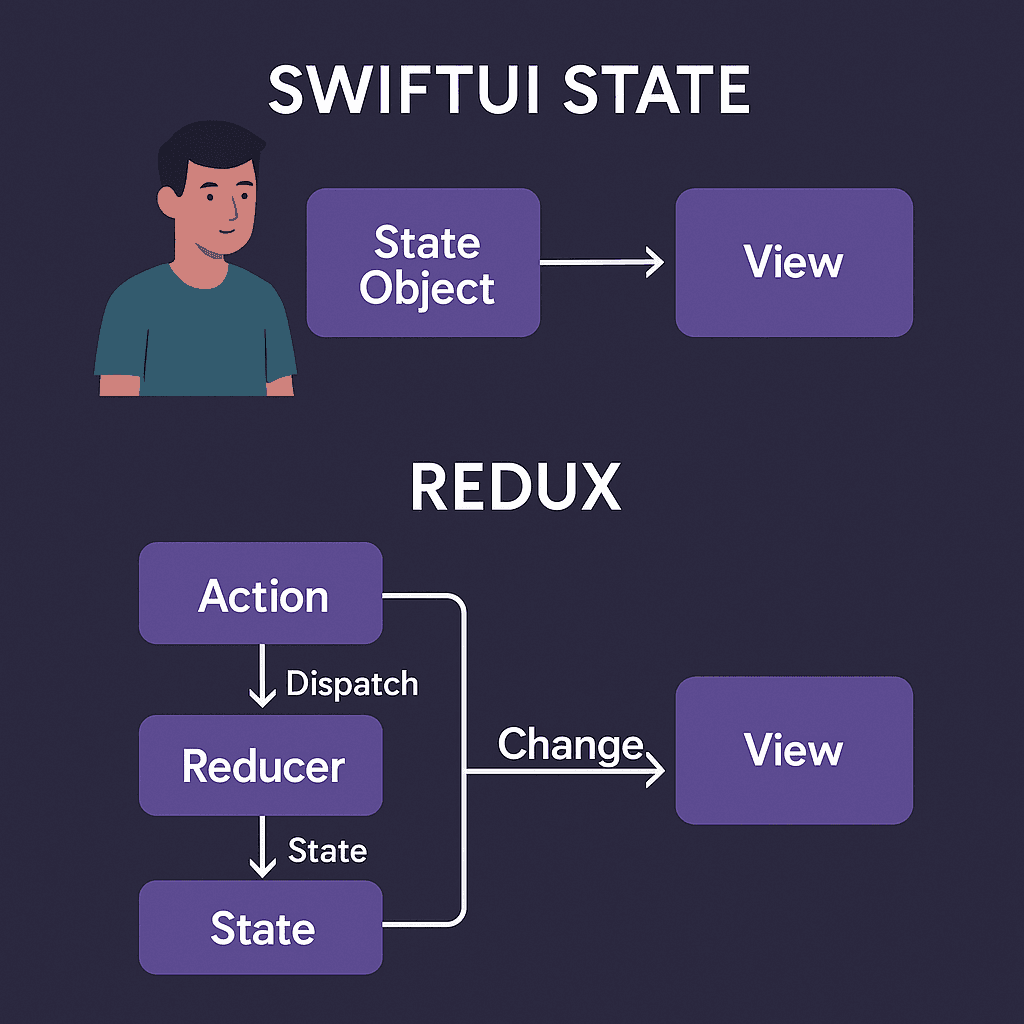
Think of Redux like this: instead of having state scattered all over your app, you put it all in one place. One single source of truth. That’s it.
But here’s where it gets clever — you can’t just randomly change that state from anywhere in your app. Nope. If you want to update something, you have to send a message describing what you want to happen. These messages are called “actions.”
So instead of directly setting user.isLoggedIn = true, you'd dispatch an action like LoginSuccess(user: someUser). Then a pure function called a "reducer" looks at that action and figures out what the new state should be.
It’s like having a really organized friend who manages all your stuff. Instead of everyone in your house just moving things around randomly, they have to tell your friend what they want to change, and your friend makes sure it happens correctly and everyone knows about it.
Actually, let me give you a concrete example that’ll make this click:
// Instead of this scattered approach:
class UserProfileViewModel: ObservableObject {
    @Published var user: User?
    func updateUsername(_ name: String) {
        user?.name = name
        // Hope the main feed somehow knows about this change...
    }
}

class MainFeedViewModel: ObservableObject {
    @Published var posts: [Post] = []
    // Posts show old username because they don't know it changed
}
You’d have this:
// All state lives here
struct AppState {
    var user: User?
    var posts: [Post] = []
}

// Changes happen through actions
enum AppAction {
    case updateUsername(String)
    case userLoggedIn(User)
}

// One function handles all updates
func reduce(state: AppState, action: AppAction) -> AppState {
    var newState = state
    switch action {
    case .updateUsername(let name):
        newState.user?.name = name
        // Update posts that reference this user too
        newState.posts = updateUserInPosts(posts: state.posts, newName: name)
    case .userLoggedIn(let user):
        newState.user = user
    }
    return newState
}
See the difference? Now when the username changes, everything that depends on it gets updated automatically. No more hunting down scattered state objects.
The beauty is in the predictability. Want to know how your app’s state can change? Look at the actions.
Want to understand what happens when an action gets dispatched? Look at the reducer.
Need to debug a state issue? You’ve got a clear paper trail of every action that led to the current state.
⚖️ Redux vs Apple’s Built-in Solutions
Now here’s where people usually ask: “Why not just use @Observable and call it a day?"
Fair question. And honestly? Sometimes you absolutely should stick with Apple’s tools.
@State is perfect for local UI stuff – whether a toggle is on, what text is in a field, if a sheet is presented. It's fast, it's simple, and it works exactly as intended.
@Observable objects are great for screen-level data management. Got a settings screen that needs to manage a bunch of user preferences? Perfect use case.
But here’s where things get messy…
Let’s say you’ve got a shopping app. Your product list screen has a ProductListModel. Your cart screen has a CartModel. Your user profile has a UserModel. All good so far.
Now a user adds something to their cart from the product list. The cart badge in the navigation bar needs to update. The product list needs to show that item is now in the cart. The cart screen needs to show the new item. And maybe the user profile needs to update their “recently added” section.
With traditional @Observable approach, you've got a few options, and they all suck:
Option 1: Pass everything down through props Your parent view becomes this massive coordinator that holds all the state and passes it down to children. Works until you need to pass cart state down through 4 levels of views just so one nested component can access it.
Option 2: Make everything an environment object Now you’ve got 6 different observable objects floating around, and nobody knows which views depend on which objects. Plus you get those lovely runtime crashes when you forget to inject one.
Option 3: Notification Center or Combine publishers Congrats, you’ve just reinvented Redux, but in a way that’s harder to debug and test.
Here’s what became clear while researching this: Apple’s state management works beautifully until you need data to flow between unrelated parts of your app. And in real apps? That happens constantly.
Redux shines because it gives you the benefits of centralized state without the downsides of prop drilling or mystery dependencies. Your views can grab exactly the state they need, and when that state changes, everything updates automatically.
But — and this is important — Redux isn’t meant to replace everything. You’d probably still use @State for local UI state. You'd still use @Observable for simple, isolated features. Redux is for the shared, complex stuff that affects multiple parts of your app.
It’s about using the right tool for the job, not replacing everything with one pattern.
🧠 The Mental Model Shift
So here’s where Redux clicks or doesn’t click for most people — it requires thinking about your app differently.
With traditional SwiftUI patterns, you think in terms of “this view owns this data.” Your profile screen owns the user data. Your settings screen owns the preferences. Makes sense, right?
Redux flips that completely. Now you think: “the app owns all the data, and views just display whatever piece they need.”
It’s like the difference between everyone in your house keeping their own grocery list versus having one shared list on the fridge that everyone can see and add to.
This shift feels weird at first. I remember staring at my first Redux setup thinking, “Wait, so my login screen doesn’t actually manage the login state?” Nope. It just displays the current login state and sends login actions when the user taps the button.
The view becomes this pure function: given some state, show this UI. Given a user interaction, dispatch this action. That’s it.
But here’s where it gets powerful — because your views don’t own their data, they’re way more predictable. Want to test how your login screen looks when there’s an error? Just give it state with an error. Want to see how the profile screen handles a loading state? Give it loading state.
No more setting up complex mock objects or trying to recreate specific network conditions.
The actions become your app’s vocabulary. Looking at your action definitions tells you everything your app can do:
enum AppAction {
    case userTappedLogin(email: String, password: String)
    case loginRequestStarted
    case loginSucceeded(user: User)
    case loginFailed(error: String)
    case userTappedLogout
    case cartItemAdded(productId: String)
    case cartItemRemoved(productId: String)
}
That’s your entire app’s behavior, right there. New developer joins the team? Hand them this enum and they understand what the app does.
The reducer becomes your app’s logic center. It’s the only place state changes, so it’s the only place you need to look when debugging state issues. No more hunting through 6 different view models trying to figure out where that user property got set to nil.
This mental shift — from “views own data” to “views display and dispatch” — is probably the biggest hurdle. But once it clicks, you start seeing state management problems differently. Instead of thinking “how do I get this data to this view,” you think “what action represents what the user just did.”
🏗️ Redux Architecture Principles
Alright, let’s break down how Redux actually works under the hood. There are three core pieces, and once you understand these, everything else makes sense.
Single Source of Truth Your entire app state lives in one place. Not scattered across view models, not hidden in UserDefaults, not duplicated in different objects. One place.
struct AppState {
    var user: User?
    var cart: Cart
    var products: [Product]
    var isLoading: Bool
    var errorMessage: String?
}
That’s it. That’s your entire app’s state. Sounds scary at first, but it’s actually liberating. Need to know if the user is logged in? Check AppState.user. Want to see what's in the cart? AppState.cart. No guessing, no hunting through different objects.
State is Read-Only Here’s the key rule: you can never directly modify state. Never. No state.user = newUser. No state.cart.items.append(newItem).
The only way to change state is by dispatching an action. This feels restrictive until you realize it gives you superpowers. Every state change is traceable. You can literally log every action and replay your app’s entire state history.
Changes are Made with Pure Functions Your reducer is just a function: give it the current state and an action, get back the new state. No side effects, no network calls, no touching the database. Just pure input → output logic.
func appReducer(state: AppState, action: AppAction) -> AppState {
    var newState = state

    switch action {
    case .loginSucceeded(let user):
        newState.user = user
        newState.isLoading = false
        newState.errorMessage = nil

    case .cartItemAdded(let productId):
        if let product = state.products.first(where: { $0.id == productId }) {
            newState.cart.items.append(CartItem(product: product))
        }
    }

    return newState
}
Notice how clean this is? No complex dependencies, no worrying about side effects. Just “if this action happens, here’s how the state should change.”
The beautiful thing about this architecture is predictability. Given the same state and action, you’ll always get the same result. Makes testing trivial and debugging way less painful.
And here’s what really sold me on Redux — time-travel debugging. Because every state change goes through actions and reducers, you can literally record all the actions and replay them later. Bug happened after 20 user interactions? No problem, just replay those 20 actions and watch exactly what went wrong.
🎯 When NOT to Use Redux
Alright, let’s talk about when Redux is overkill — because honestly, it often is.
Simple apps with independent screens Building a basic calculator? A simple note-taking app? A flashcard app where each screen does its own thing? Don’t even think about Redux. You’re adding complexity for zero benefit.
If your screens don’t share data and user actions don’t affect multiple parts of your app, @State and maybe some @Observable objects are all you need.
Learning projects and prototypes When you’re learning SwiftUI or trying out a new idea, focus on getting the feature working first. Redux adds a layer of indirection that can slow down experimentation.
Prototype with simple state management, then consider Redux if the idea grows into something complex.
Small teams without discipline This one’s harsh but true — Redux only works if your team actually follows the patterns. If people start directly mutating state or bypassing the action system, you’ve got all the complexity of Redux with none of the benefits.
Better to stick with simpler patterns than have half-implemented Redux.
Apps where most state is truly local Some apps are just collections of independent features. A utility app with a tip calculator, unit converter, and weather widget? Each feature can manage its own state perfectly fine.
Redux shines when data flows between features, not when features are isolated.
When you’re fighting the pattern If you find yourself constantly thinking “this would be easier with a simple @Observable object," you're probably right. Redux should feel like it's solving problems, not creating them.
The moment you start building escape hatches or workarounds for the Redux pattern, step back and ask if you actually need it.
The honest truth? Most iOS apps probably don’t need Redux. Apple’s state management tools cover the majority of use cases perfectly well. Redux is for the specific pain point of complex, shared state — and if you don’t have that pain point, you don’t need the solution.
🚀 Setting Up for Implementation
So you’ve made it this far and Redux actually sounds like it might solve your problems. Good news — implementing it in SwiftUI is way more straightforward than you might expect.
Here’s what we’re going to cover in the next article: building a complete Redux system from scratch. No third-party libraries, no magic frameworks, just pure Swift and SwiftUI doing exactly what you need.
We’ll start with the basic store structure using @Observable, then build out actions and reducers step by step. You'll see how to handle async operations (spoiler: it's different from web Redux), how to structure your state for real apps, and how to actually integrate everything with SwiftUI views.
The cool part? By the end, you’ll have a production-ready Redux implementation that you completely understand. No black box dependencies, no wondering how the magic works under the hood.
We’ll also cover the stuff that tutorials usually skip — how to handle navigation state, where to put business logic, how to test your reducers, and those annoying edge cases that pop up in real apps.
But here’s the key thing I want you to remember: Redux isn’t about following some perfect pattern from a textbook. It’s about solving the specific state management problems that are making your life difficult.
So when we build this thing, we’ll focus on practical patterns that actually work in iOS apps, not just theoretical purity. Because at the end of the day, the best architecture is the one that makes your app more predictable and your development process smoother.
Ready to get your hands dirty with some actual code? Next up: “Building Redux from Scratch in SwiftUI: Production-Ready Implementation.”
🎉 Enjoyed this article? Your support means the world to me!
💬 Drop a comment below! I love hearing about your experiences and answering questions
🎬 Subscribe on Youtube and become early subscribers of my channel: https://www.youtube.com/@swift-pal
💼 Let’s connect on LinkedIn for more professional insights: https://www.linkedin.com/in/karan-pal
Happy coding! 🚀
New articles, straight to your inbox.
No spam, no filler — just new writing on iOS, the web, and AI when it ships. Unsubscribe anytime.
Keep reading
Your CPU Has More Cores Than Your Job Can Use
Some work splits cleanly across hundreds of cores. Other work is a chain of steps where every new step has to wait for the last one to finish.
ReadYour Password Isn’t as Random as You Think
Crack-time calculators measure the size of a theoretical password space—not how people actually choose passwords or how attackers search them.
Read