The Swift Property Trick That Makes Your Code Self-Healing
How two simple keywords can transform your properties into intelligent, self-updating powerhouses
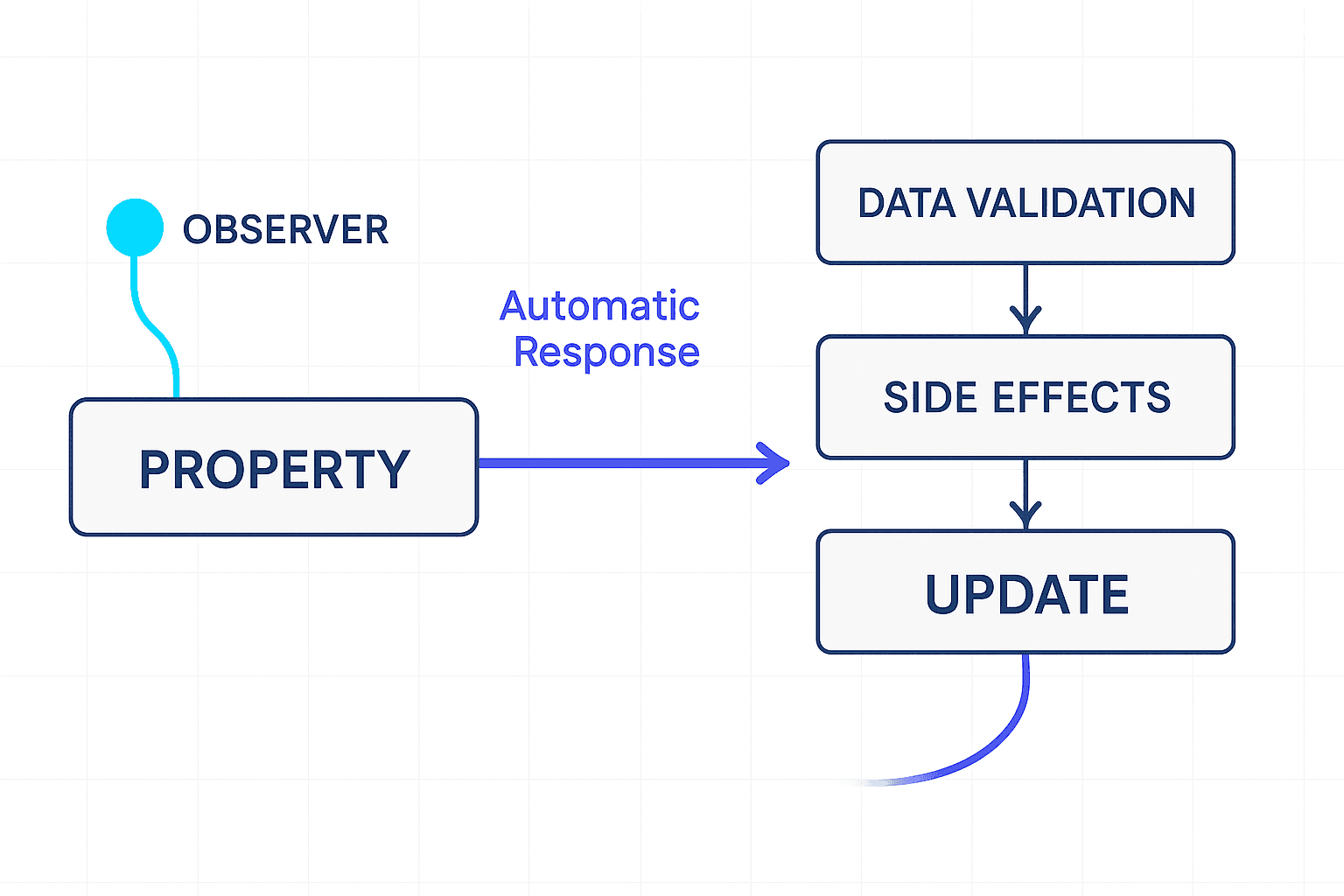

I used to think property observers were just… decoration. Like, sure, willSet and didSet exist, but who actually uses them? Then I spent three days debugging a subtle UI sync issue that could’ve been prevented with literally two lines of code.
That’s when it hit me. These aren’t just “nice to have” features — they’re actually one of Swift’s most powerful tools for building resilient, self-maintaining code. And most developers are completely ignoring them.
Look, we’ve all been in that situation where changing one property breaks something completely unrelated across the app. Your user’s profile picture updates, but suddenly the navigation bar title is wrong. You update a cart total, but the checkout button doesn’t enable. Sound familiar?
What if I told you there’s a way to make your properties automatically handle all their side effects, validate their own data, and keep your UI perfectly in sync — without you having to remember to do it manually every time?
📺 Coming soon to Swift Pal: https://youtube.com/@swift-pal — I’ll be diving deep into advanced property observer patterns!
**Swift Pal** _👨💻 Welcome to Swift Pal - Your iOS Dev Companion! Whether you're just starting your journey with Swift and SwiftUI…_youtube.comhttps://youtube.com/@swift-pal
🔍 The Problem Most Developers Don’t Even Realize They Have
Here’s a typical scenario. You’ve got a user profile view, and whenever the user’s online status changes, you need to update the UI, log the change, and maybe send some analytics. Most developers handle this like this:
class UserProfileViewModel {
    var user: User {
        didSet {
            updateUI()
            logUserChange()
            trackAnalytics()
        }
    }

    init(user: User) {
        self.user = user
    }

    func updateUserStatus(_ status: OnlineStatus) {
        user.status = status
        // Oops! Forgot to call the side effects here
    }

    func updateUserName(_ name: String) {
        user.name = name
        // And here too
    }

    private func updateUI() {
        // Update status indicator
        // Update name label
        // Update avatar
    }

    private func logUserChange() {
        print("User updated: \(user.name)")
    }

    private func trackAnalytics() {
        Analytics.track("user_updated", properties: ["user_id": user.id])
    }
}
See the problem? The didSet observer only triggers when you directly assign to user, but not when you modify properties inside the user object. So half your UI updates get missed, and you end up with inconsistent state all over the place.
This is where most tutorials stop. They show you didSet on simple properties like var count: Int, but they don't show you how to handle the real-world complexity of nested objects and multiple related properties.
🎯 Property Observers That Actually Work
Here’s the thing willSet and didSet don’t just watch for changes — they can actively participate in maintaining your app’s state. Let me show you what I mean:
class SmartUserProfileViewModel {
    private var _user: User

    var user: User {
        get { _user }
        set {
            let oldUser = _user

            // willSet equivalent - validation before change
            guard newValue.isValid else {
                print("Invalid user data, rejecting change")
                return
            }

            _user = newValue

            // didSet equivalent - reactions after change
            handleUserChange(from: oldUser, to: newValue)
        }
    }

    var isOnline: Bool {
        willSet {
            if newValue != isOnline {
                prepareForStatusChange(goingOnline: newValue)
            }
        }
        didSet {
            if oldValue != isOnline {
                handleStatusChange(wasOnline: oldValue)
            }
        }
    }

    init(user: User) {
        self._user = user
        self.isOnline = user.status == .online
    }

    private func handleUserChange(from oldUser: User, to newUser: User) {
        // Only update what actually changed
        if oldUser.name != newUser.name {
            updateNameDisplay()
            Analytics.track("user_name_changed")
        }

        if oldUser.avatar != newUser.avatar {
            updateAvatarDisplay()
            preloadHighResAvatar()
        }

        if oldUser.status != newUser.status {
            isOnline = newUser.status == .online
        }
    }

    private func prepareForStatusChange(goingOnline: Bool) {
        if goingOnline {
            // Prepare resources we'll need
            NetworkManager.shared.enableRealtimeUpdates()
        } else {
            // Clean up resources we won't need
            NetworkManager.shared.disableRealtimeUpdates()
        }
    }

    private func handleStatusChange(wasOnline: Bool) {
        updateStatusIndicator()

        if isOnline && !wasOnline {
            // User just came online
            refreshUserData()
            showWelcomeBackMessage()
        } else if !isOnline && wasOnline {
            // User just went offline
            saveUnsyncedChanges()
            showOfflineMode()
        }
    }

    private func updateNameDisplay() { /* Update UI */ }
    private func updateAvatarDisplay() { /* Update UI */ }
    private func updateStatusIndicator() { /* Update UI */ }
    private func preloadHighResAvatar() { /* Background task */ }
    private func refreshUserData() { /* Network call */ }
    private func showWelcomeBackMessage() { /* Show toast */ }
    private func saveUnsyncedChanges() { /* Persist data */ }
    private func showOfflineMode() { /* Update UI state */ }
}
Now here’s the beautiful part — whenever isOnline changes (from anywhere in your code), all the appropriate side effects happen automatically. You don't have to remember to call anything. The property takes care of itself.
🧠 Smart Properties That Validate Themselves
But wait, it gets better. You can use property observers to create properties that actively prevent invalid states:
class BankAccount {
    private var _balance: Decimal = 0

    var balance: Decimal {
        get { _balance }
        set {
            // Validate before setting
            guard newValue >= 0 else {
                print("Cannot set negative balance: \(newValue)")
                notifyInvalidTransaction()
                return
            }

            let oldBalance = _balance
            _balance = newValue

            // React to changes
            handleBalanceChange(from: oldBalance, to: newValue)
        }
    }

    var accountStatus: AccountStatus = .active {
        willSet {
            // Prepare for status change
            if newValue == .frozen {
                backupCurrentTransactions()
                notifyUser("Account will be frozen")
            }
        }
        didSet {
            // React to status change
            switch accountStatus {
            case .active:
                if oldValue != .active {
                    restoreAccountFeatures()
                }
            case .frozen:
                disableTransactions()
                showFrozenAccountUI()
            case .closed:
                finalizeAccountClosure()
                clearSensitiveData()
            }
        }
    }

    private func handleBalanceChange(from old: Decimal, to new: Decimal) {
        // Log the change
        TransactionLogger.log(balanceChange: new - old)

        // Update UI
        updateBalanceDisplay()

        // Check for important thresholds
        if new < 100 && old >= 100 {
            notifyLowBalance()
        }

        if new >= 10000 && old < 10000 {
            offerPremiumServices()
        }
    }

    func deposit(_ amount: Decimal) {
        balance += amount  // Automatically handles validation and side effects
    }

    func withdraw(_ amount: Decimal) -> Bool {
        guard amount <= balance else { return false }
        balance -= amount  // Automatically handles everything
        return true
    }

    private func notifyInvalidTransaction() { /* Show error */ }
    private func backupCurrentTransactions() { /* Backup logic */ }
    private func notifyUser(_ message: String) { /* User notification */ }
    private func restoreAccountFeatures() { /* Restore functionality */ }
    private func disableTransactions() { /* Disable features */ }
    private func showFrozenAccountUI() { /* Update UI */ }
    private func finalizeAccountClosure() { /* Cleanup */ }
    private func clearSensitiveData() { /* Security cleanup */ }
    private func updateBalanceDisplay() { /* UI update */ }
    private func notifyLowBalance() { /* Alert user */ }
    private func offerPremiumServices() { /* Marketing opportunity */ }
}

enum AccountStatus {
    case active, frozen, closed
}
Now your BankAccount object is basically bulletproof. You can't accidentally set invalid balances, and every state change automatically handles all its side effects. The object heals itself.
🔄 Reactive UI Updates Without Reactive Frameworks
Here’s something that blew my mind — you can use property observers to create reactive UI updates without pulling in huge frameworks like Combine or RxSwift:
class SearchViewModel {
    var searchQuery: String = "" {
        didSet {
            guard searchQuery != oldValue else { return }

            // Cancel previous search
            searchTask?.cancel()

            // Immediate UI updates
            isSearching = !searchQuery.isEmpty

            if searchQuery.isEmpty {
                searchResults = []
                return
            }

            // Debounced search
            searchTask = Task {
                try await Task.sleep(nanoseconds: 300_000_000) // 300ms delay
                await performSearch()
            }
        }
    }

    var searchResults: [SearchResult] = [] {
        didSet {
            updateResultsDisplay()
            isSearching = false

            // Analytics
            if !searchResults.isEmpty {
                Analytics.track("search_results", properties: [
                    "query": searchQuery,
                    "result_count": searchResults.count
                ])
            }
        }
    }

    var isSearching: Bool = false {
        didSet {
            updateLoadingState()

            if isSearching {
                showSearchingIndicator()
            } else {
                hideSearchingIndicator()
            }
        }
    }

    private var searchTask: Task<Void, Error>?

    private func performSearch() async {
        isSearching = true

        do {
            let results = try await SearchAPI.search(query: searchQuery)
            searchResults = results
        } catch {
            searchResults = []
            showSearchError(error)
        }
    }

    private func updateResultsDisplay() { /* Update table view */ }
    private func updateLoadingState() { /* Show/hide spinner */ }
    private func showSearchingIndicator() { /* UI update */ }
    private func hideSearchingIndicator() { /* UI update */ }
    private func showSearchError(_ error: Error) { /* Error handling */ }
}
Just by typing in the search field, the entire search flow happens automatically — debouncing, loading states, result updates, analytics tracking. All handled by the properties themselves.
🎭 Advanced Pattern: Computed Properties with Side Effects
Now here’s where it gets really interesting. You can combine computed properties with stored properties to create incredibly sophisticated behavior:
class ShoppingCart {
    private var _items: [CartItem] = [] {
        didSet {
            recalculateTotals()
            updateCartBadge()
            persistCart()

            // Smart suggestions based on cart contents
            if _items.count >= 3 {
                loadRecommendedItems()
            }
        }
    }

    var items: [CartItem] {
        get { _items }
        set { _items = newValue }
    }

    private var _subtotal: Decimal = 0
    private var _tax: Decimal = 0
    private var _shipping: Decimal = 0

    var subtotal: Decimal {
        get { _subtotal }
        private set {
            _subtotal = newValue
            // Subtotal changes can affect shipping and discounts
            recalculateShipping()
            applyDiscounts()
        }
    }

    var total: Decimal {
        return subtotal + tax + shipping
    }

    var isEmpty: Bool {
        return _items.isEmpty
    } {
        didSet {
            // When cart becomes empty or gets first item
            if isEmpty != oldValue {
                if isEmpty {
                    clearRecommendations()
                    hideCheckoutButton()
                } else {
                    showCheckoutButton()
                    startAbandonmentTimer()
                }
            }
        }
    }

    func addItem(_ item: CartItem) {
        if let existingIndex = _items.firstIndex(where: { $0.productId == item.productId }) {
            _items[existingIndex].quantity += item.quantity
        } else {
            _items.append(item)
        }

        // This automatically triggers all the didSet observers
        Analytics.track("item_added_to_cart", properties: [
            "product_id": item.productId,
            "quantity": item.quantity,
            "cart_total": total
        ])
    }

    func removeItem(at index: Int) {
        guard index < _items.count else { return }
        let removedItem = _items.remove(at: index)

        Analytics.track("item_removed_from_cart", properties: [
            "product_id": removedItem.productId
        ])
    }

    private func recalculateTotals() {
        subtotal = _items.reduce(0) { $0 + ($1.price * Decimal($1.quantity)) }
        _tax = subtotal * 0.08 // 8% tax
    }

    private func recalculateShipping() {
        if subtotal >= 50 {
            _shipping = 0 // Free shipping over $50
        } else {
            _shipping = 5.99
        }
    }

    private func applyDiscounts() {
        // Complex discount logic here
    }

    private func updateCartBadge() { /* Update UI badge */ }
    private func persistCart() { /* Save to UserDefaults/CoreData */ }
    private func loadRecommendedItems() { /* API call for suggestions */ }
    private func clearRecommendations() { /* Clear suggestions */ }
    private func hideCheckoutButton() { /* UI update */ }
    private func showCheckoutButton() { /* UI update */ }
    private func startAbandonmentTimer() { /* Marketing automation */ }
}

struct CartItem {
    let productId: String
    let name: String
    let price: Decimal
    var quantity: Int
}
The beauty here? Every time you modify the cart in any way, everything stays perfectly in sync. Totals recalculate, UI updates, persistence happens, analytics track — all automatically.
🎨 Creative Patterns You Probably Haven’t Seen
Here are some advanced patterns I’ve discovered that really showcase the power of property observers:
- Automatic dirty tracking
class SmartModel {
    private var _isDirty = false

    var isDirty: Bool {
        get { _isDirty }
        private set {
            guard newValue != _isDirty else { return }
            _isDirty = newValue

            if newValue {
                startAutoSave()
            } else {
                stopAutoSave()
            }
        }
    }

    var name: String = "" {
        didSet { isDirty = name != originalName }
    }

    var email: String = "" {
        didSet { isDirty = email != originalEmail }
    }

    private let originalName: String
    private let originalEmail: String
    private var autoSaveTimer: Timer?

    init(name: String, email: String) {
        self.originalName = name
        self.originalEmail = email
        self.name = name
        self.email = email
    }

    private func startAutoSave() {
        autoSaveTimer = Timer.scheduledTimer(withTimeInterval: 2.0, repeats: false) { _ in
            self.save()
        }
    }

    private func stopAutoSave() {
        autoSaveTimer?.invalidate()
        autoSaveTimer = nil
    }

    private func save() {
        // Save logic here
        isDirty = false
    }
}
2\. Smart caching with automatic invalidation:
class CachedDataManager {
    private var _cachedData: [String: Any]?
    private var lastFetchTime: Date?

    var data: [String: Any]? {
        get {
            if shouldRefreshCache {
                Task { await refreshData() }
            }
            return _cachedData
        }
        set {
            _cachedData = newValue
            lastFetchTime = Date()
        }
    }

    private var shouldRefreshCache: Bool {
        guard let lastFetch = lastFetchTime else { return true }
        return Date().timeIntervalSince(lastFetch) > 300 // 5 minutes
    }

    private func refreshData() async {
        // Fetch fresh data
        // data = fetchedData automatically updates cache timestamp
    }
}
🏁 The Self-Healing Code Revolution
So here’s what we’ve discovered: willSet and didSet aren’t just about watching for changes — they’re about creating intelligent, self-maintaining code that handles its own side effects, validates its own data, and keeps everything in perfect sync.
The “self-healing” part comes from the fact that your properties can now:
- Validate themselves before accepting new values
- Automatically trigger necessary side effects
- Keep related state synchronized
- Handle complex business logic transparently
- Make your entire codebase more resilient to bugs
Instead of scattering state management logic throughout your app, you centralize it right where the data lives. Your properties become smart, your objects become resilient, and your bugs become much rarer.
Next time you’re writing a property that affects other parts of your app, ask yourself: “What needs to happen when this changes?” Then put that logic right in the property observer. Your future self will thank you when everything just… works.
The two “simple keywords” I promised? willSet and didSet. But as you can see, they’re capable of some pretty sophisticated behavior when you use them thoughtfully.
📺 Watch for my upcoming Swift Pal series where I’ll show you even more advanced property observer patterns, including how to build reactive architectures without external frameworks!
🎉 Enjoyed this article? Your support means the world to me!
💬 Drop a comment below! I love hearing about your experiences and answering questions
🎬 Subscribe on Youtube and become early subscribers of my channel: https://www.youtube.com/@swift-pal
💼 Let’s connect on LinkedIn for more professional insights: https://www.linkedin.com/in/karan-pal
Happy coding! 🚀
New articles, straight to your inbox.
No spam, no filler — just new writing on iOS, the web, and AI when it ships. Unsubscribe anytime.
Keep reading
Your CPU Has More Cores Than Your Job Can Use
Some work splits cleanly across hundreds of cores. Other work is a chain of steps where every new step has to wait for the last one to finish.
ReadYour Password Isn’t as Random as You Think
Crack-time calculators measure the size of a theoretical password space—not how people actually choose passwords or how attackers search them.
Read