Build an On-Device Summariser in SwiftUI, and Measure What It Costs
A complete SwiftUI app that summarises text entirely on-device, and the first-token numbers behind it: 27x slower on the simulator than on a real phone.
Apple's on-device model has been available since iOS 26. No API key, no network call, no per-token bill. You import a framework and ask it for something.
The demos make it look like three lines of code. It isn't. The first thing you write is not the part that generates text, it is the part that handles the model not being there at all, and the second thing you write should be a stopwatch.
This post builds a small app that does both. Paste text, get a streaming summary, and see on screen how long it took before the first characters appeared.
By the end you will have a working app and a number. The number surprised me. It also changes by a factor of twenty-seven depending on where you run it.
Everything here is stable Xcode 26.6 and iOS 26. No beta.
What you need
A new iOS app from the Xcode wizard. File ▸ New ▸ Project ▸ iOS ▸ App, SwiftUI interface, Swift, storage None. I called mine SummariseAnything. The wizard sets the deployment target to iOS 26.5, which is fine; FoundationModels needs 26.0 or later.
You also need Apple Intelligence switched on. That sounds obvious and it is where most of this post's first surprise lives, so leave it for a moment.
Assume the model is not there
Start with the part everyone skips.
SystemLanguageModel.default.availability returns either .available or .unavailable with a reason, and there are three reasons. They are not variations on a theme. They are three different problems belonging to three different people.
deviceNotEligible means this hardware will never run it. Nothing the user does will change that. appleIntelligenceNotEnabled is a trip to Settings, ten seconds, fixed. modelNotReady means the model is a multi-gigabyte download that has not finished, so the honest message is "come back later, stay on Wi-Fi".
Collapse all three into one grey "unavailable" label and you have told a user with a ten-second problem that their phone is broken.
Create a new file:
//  ModelAvailability.swift

import FoundationModels

enum ModelStatus: Equatable {
    case ready
    case notEnabled
    case downloading
    case unsupportedDevice
    case unknownReason

    static var current: ModelStatus {
        switch SystemLanguageModel.default.availability {
        case .available:
            return .ready
        case .unavailable(let reason):
            switch reason {
            case .appleIntelligenceNotEnabled:
                return .notEnabled
            case .modelNotReady:
                return .downloading
            case .deviceNotEligible:
                return .unsupportedDevice
            @unknown default:
                return .unknownReason
            }
        }
    }

    var title: String {
        switch self {
        case .ready: return "Ready"
        case .notEnabled: return "Apple Intelligence is off"
        case .downloading: return "Still downloading"
        case .unsupportedDevice: return "Not supported on this device"
        case .unknownReason: return "Unavailable"
        }
    }

    var detail: String {
        switch self {
        case .ready:
            return "Summaries run entirely on this device."
        case .notEnabled:
            return "Turn it on in Settings ▸ Apple Intelligence & Siri, then come back."
        case .downloading:
            return "The model is a multi-gigabyte download and it isn't finished yet. "
                 + "Leave the device on Wi-Fi and try again later."
        case .unsupportedDevice:
            return "This device can't run the on-device model. Nothing you can change here."
        case .unknownReason:
            return "The model reported a reason this app doesn't recognise."
        }
    }
}
That @unknown default is not decoration. UnavailableReason is not a frozen enum, so Apple can add reasons to it later, and if you build in the Swift 6 language mode an exhaustive switch without it is a compile error rather than a warning. The list of ways this can fail is expected to grow.
The rest of the file is deliberately dull, and the dullness is the design. ModelStatus is the app's own type, not Apple's, and current is the only place in the entire codebase that touches SystemLanguageModel.availability. Everything downstream, the view included, works with a plain enum that carries its own user-facing strings. If Apple adds a fourth reason, one switch changes. If you scatter availability checks across your views instead, you will be hunting them for the rest of the app's life.
Splitting title from detail is the same instinct at a smaller scale. A headline the user can read in a glance, and a sentence telling them what to do about it, which is the part almost every "unavailable" screen forgets to include.
The surprise: availability is per-simulator
I assumed the simulator would inherit Apple Intelligence from the Mac hosting it. It does not, or at least not in any way you can rely on.
Two simulators, same machine, same build, same minute:
iPhone 17 Pro       available
iPhone 17 Pro Max   appleIntelligenceNotEnabled
The first had been used earlier that day. The second had never been booted. Same host, opposite answers.

This is genuinely good news for the shape of this app, because it means the unavailable path is not theoretical. If you spin up a fresh simulator to follow along, you will land on it. Most tutorials treat availability handling as boilerplate you write once and never see run. Here you will probably see it first.
The session
LanguageModelSession is the thing you talk to. It takes instructions, which are not the same as a prompt: instructions describe the job and persist across the conversation, the prompt is the specific input. Putting "reply in three sentences" in the prompt works, until the second request.
//  Summariser.swift

import Foundation
import FoundationModels
import Observation

@Observable
final class Summariser {
    private(set) var summary = ""
    private(set) var timeToFirstToken: Duration?
    private(set) var isWorking = false
    private(set) var failure: String?

    @ObservationIgnored
    private lazy var session = LanguageModelSession(instructions: """
        You summarise text that someone has just shared with you.
        Reply with at most three short sentences of plain prose.
        No bullet points, no headings, and no preamble such as "Here is a summary".
        """)

    func summarise(_ text: String) async {
        guard !text.trimmingCharacters(in: .whitespacesAndNewlines).isEmpty else { return }

        isWorking = true
        failure = nil
        summary = ""
        timeToFirstToken = nil

        let clock = ContinuousClock()
        let start = clock.now

        do {
            for try await snapshot in session.streamResponse(to: text) {
                if timeToFirstToken == nil && !snapshot.content.isEmpty {
                    timeToFirstToken = clock.now - start
                }
                summary = snapshot.content
            }
        } catch {
            failure = Self.message(for: error)
        }

        isWorking = false
    }

    private static func message(for error: any Error) -> String {
        guard let generation = error as? LanguageModelSession.GenerationError else {
            return error.localizedDescription
        }
        switch generation {
        case .exceededContextWindowSize:
            return "That text is longer than the model's context window. Try a shorter passage."
        case .guardrailViolation:
            return "The safety filter blocked this text."
        case .refusal:
            return "The model declined to summarise this text."
        default:
            return generation.localizedDescription
        }
    }
}
Walking through it, since a few of those lines are doing more than they look like.
The four properties are all private(set). The view reads them and only summarise writes them, which matters because a partially-updated state during streaming is the easiest way to get a view that flickers between the old summary and the new one.
The session is lazy. Building a LanguageModelSession is not free, and building one at app launch means doing that work before you know whether the user will ever tap the button. Lazy also means it is built on first use rather than during view construction, which turns out to matter more than I expected, and there is a section on that below.
summarise clears summary and timeToFirstToken before it starts. Miss that and a failed second request leaves the first request's answer sitting on screen, looking like a fresh result.
The clock is ContinuousClock, not Date(). Date follows the system clock, so an NTP correction or the user changing their timezone mid-request can produce a negative duration. ContinuousClock counts forward regardless and keeps counting while the device is asleep, which is what you want for measuring elapsed work.
The timing line reads if timeToFirstToken == nil && !snapshot.content.isEmpty. Both halves are load-bearing. The nil check makes it record only the first arrival rather than overwriting on every snapshot, and the empty check exists because the first snapshot can arrive with nothing in it, which would give you a beautifully precise measurement of nothing.
message(for:) takes any Error and narrows to GenerationError, rather than typing the catch block. Streaming can throw things that are not generation errors, cancellation being the obvious one, and a switch that assumes otherwise crashes on the day someone backgrounds the app mid-summary.
Two details are worth their own sections.
Snapshots are cumulative
streamResponse(to:) gives you an AsyncSequence of snapshots, and each snapshot carries the whole response so far. Not the delta. So the line is:
summary = snapshot.contentWrite summary += snapshot.content instead and you get every partial response concatenated into a growing mess. First few words. Then the first few words plus a bit more. Then all of that again. It reads like the model is stuttering, so you go and investigate the model, which is fine and correct and a complete waste of an afternoon.
I checked rather than assumed, by recording every snapshot and testing whether each began with the previous one. Every run, every platform, cumulative.
The other thing that fell out of that check: streaming is chunkier than the marketing suggests. A three-sentence summary of around 400 characters arrives in six to fourteen snapshots, roughly fifty characters at a time. It is not token by token, and your view updates far less often than you might design for.
It copies, about a third of the time
This is the part I nearly missed, and it is the most important thing in the post.
I measured latency for twelve runs before I read a single summary. Character counts, timings, snapshot counts, all captured. Then I looked at the output and found the model had, on several of those runs, handed back the input almost word for word.
Not paraphrased. Copied.
The counts should have told me. Twelve runs on a 700-character input produced 356, 438, 407, 356, 630, 388, 316, 607, 630, 381, 620 and 301 characters. That is not a spread, it is two clusters: one around 350 and one around 620, and 620 out of 700 is not a summary of anything.
So I tested it properly. Eight runs, and instead of counting characters I checked whether a phrase that appears only in the source ("removing one entry can pop two") survived into the output:
prompt shape      copied verbatim
bare text            2 of 8
task restated        3 of 8
My first guess was that the instructions were too weak, and that restating the task inside the prompt would fix it. It does not. Both shapes copy at roughly the same rate, somewhere between a quarter and a third of runs. One output copied the phrase while still being short, so this is not always a whole echo; sometimes it is a summary with a chunk of source embedded in it.
Here is what it looks like when it happens. The only difference between the input and the "summary" is the tense:

The simulator is worse at this, for what it is worth. Every simulator run I inspected copied, four out of four, against roughly one in three on the phone. I would not lean on those numbers, the sample is small, but it is one more reason not to judge this model by what you see in the simulator.
Which means a summariser built exactly like this one will hand a user back their own text, silently, every third or fourth time they tap the button. It will look like the app is broken. It is not, and there is nothing in the API that flags it.
You can detect it cheaply. Take a distinctive phrase from the middle of the input, check whether it appears verbatim in the output, and try again if it does.
Except that "try again" has a trap in it, and it cost me an hour.
Ask the same session the same question a second time and you get a byte-identical answer. Four consecutive requests to one session returned exactly 630 characters each time, the same 630 characters. Create a fresh session per request and the same input gives 359, 630, 295 and 188 characters, all different text.
same session, asked 4×    630  630  630  630
fresh session each time   359  630  295  188
So a retry button that reuses the session does nothing at all. It will look like the model is stuck. The retry has to build a new LanguageModelSession.
This is also why the app's session is lazy rather than created once and held forever. A session accumulates a transcript, which means a long-lived one is both repeating itself and quietly eating the 4,096-token window you are about to run out of.
I do not yet know what drives it. GenerationOptions exposes sampling controls, so there is an obvious next experiment, and that is where the next post starts.
The general point is worth more than the specific bug: I had twelve clean-looking measurements of something I had never actually read.
Three ways it can say no
The error switch above catches something the happy-path demos hide. There are three distinct refusal shaped failures, and they are not the same thing.
exceededContextWindowSize is the text being too long. guardrailViolation is the safety filter blocking it. refusal is the model itself declining, and unlike the other two it carries an explanation you can read.
The first one is easy to trigger. Paste in a whole article and you get this:

Handling all three properly is its own post. Handling them badly right now still beats a spinner that never stops.
The view
//  ContentView.swift

import SwiftUI

struct ContentView: View {
    @State private var status: ModelStatus?
    @State private var summariser = Summariser()
    @State private var input = ""
    @FocusState private var editing: Bool

    var body: some View {
        NavigationStack {
            Group {
                switch status {
                case .ready: summariseForm
                case .some(let unavailable): unavailableNotice(unavailable)
                case .none: ProgressView()
                }
            }
            .padding()
            .navigationTitle("Summarise Anything")
        }
        .task { status = ModelStatus.current }
    }

    private var summariseForm: some View {
        VStack(alignment: .leading, spacing: 16) {
            Text("Paste something worth shortening.")
                .font(.subheadline)
                .foregroundStyle(.secondary)

            TextEditor(text: $input)
                .font(.body)
                .frame(minHeight: 160)
                .overlay(RoundedRectangle(cornerRadius: 8).stroke(.quaternary))
                .focused($editing)
                .toolbar {
                    ToolbarItemGroup(placement: .keyboard) {
                        Spacer()
                        Button("Done") { editing = false }
                    }
                }

            Button {
                Task { await summariser.summarise(input) }
            } label: {
                if summariser.isWorking {
                    ProgressView()
                } else {
                    Text("Summarise")
                }
            }
            .buttonStyle(.borderedProminent)
            .disabled(input.isEmpty || summariser.isWorking)

            if let failure = summariser.failure {
                Text(failure)
                    .font(.callout)
                    .foregroundStyle(.red)
            }

            if !summariser.summary.isEmpty {
                Text(summariser.summary)
                    .font(.body)
                    .textSelection(.enabled)
            }

            if let ttft = summariser.timeToFirstToken {
                Text("First token after \(Self.milliseconds(ttft))")
                    .font(.caption.monospaced())
                    .foregroundStyle(.secondary)
            }

            Spacer()
        }
    }

    private func unavailableNotice(_ status: ModelStatus) -> some View {
        VStack(spacing: 12) {
            Text(status.title)
                .font(.headline)
            Text(status.detail)
                .font(.subheadline)
                .foregroundStyle(.secondary)
                .multilineTextAlignment(.center)
        }
        .frame(maxWidth: .infinity, maxHeight: .infinity)
    }

    private static func milliseconds(_ duration: Duration) -> String {
        let ms = Double(duration.components.seconds) * 1000
               + Double(duration.components.attoseconds) / 1_000_000_000_000_000
        return String(format: "%.0f ms", ms)
    }
}

#Preview {
    ContentView()
}
The thing to notice first is where the availability check happens. It is in .task, not in the @State default. Availability is a live property of the system rather than a constant, and modelNotReady in particular can become available while your app is open, because the download finished. Read it once at initialisation and you get a stale answer you never revisit.
status is an optional ModelStatus, and the three-way switch is deliberate. nil is not "the model is unavailable", it is "we have not asked yet", and those want different screens. Collapse them and the app flashes an alarming "Apple Intelligence is off" message for a frame or two on every cold launch, before the check completes and it corrects itself. Users notice that. The nil branch shows a spinner instead.
unavailableNotice takes the status as a parameter rather than reading the property. That is what case .some(let unavailable) is for: inside that branch the compiler knows there is a real value, so there is no optional to unwrap and no way to render the view in a state that cannot happen.
The TextEditor gets @FocusState and a keyboard toolbar with a Done button. SwiftUI gives a TextEditor no return-key dismissal and no tap-outside dismissal, so without this the keyboard comes up on first tap and never leaves, covering the button the reader is trying to press. I built it without one and could not use my own app.
The button shows a ProgressView in place of its label while isWorking, and is disabled on empty input. Both are small, and both are the difference between a demo and something you would let another person touch.
Then milliseconds, which is the ugliest function in the file and deserves an explanation. Duration does not hand you a Double of seconds. It stores components.seconds and components.attoseconds, an attosecond being 10⁻¹⁸ of a second, so converting means scaling the seconds up by a thousand and the attoseconds down by 10¹⁵ and adding them. There are formatting APIs that will render a Duration for you, but they are built for human-readable output like "0.4 sec" rather than a fixed millisecond figure you can compare across runs, and comparing across runs is the entire point here.
Run it. Paste a few paragraphs. Watch the summary appear.

The number
Time to first token is the number users feel. Total generation time is the number benchmarks report, and it is the less useful of the two, because a reader is already reading by the time the rest arrives.
Twelve consecutive runs on an iPhone 15 Pro Max, same 150-word input each time, a fresh session per run so the conversation never grows:
run   ttft(s)  total(s)  chars
  1     1.152     2.114     356
  2     0.404     1.718     438
  3     0.366     1.606     407
  4     0.399     1.428     356
  5     0.359     2.162     630
  6     0.360     1.610     388
  7     0.378     1.310     316
  8     0.401     2.413     607
  9     0.389     2.210     630
 10     0.402     1.586     381
 11     0.377     2.066     620
 12     0.376     1.230     301
The first run costs about three times the rest. That is the model loading, and it is the one number your users will actually experience, because for most apps the first summary of the session is the only summary of the session.
After that it settles at 0.383 seconds on average, and it is remarkably consistent: every warm run landed between 0.359 and 0.404, a spread of under six percent. Generation throughput held at roughly 340 to 350 characters per second regardless of how long the output was.
So the practical shape is: about a second and a bit for the first summary, then a third of a second to first text and a second and a half in total for each one after.
Do not measure this in the simulator
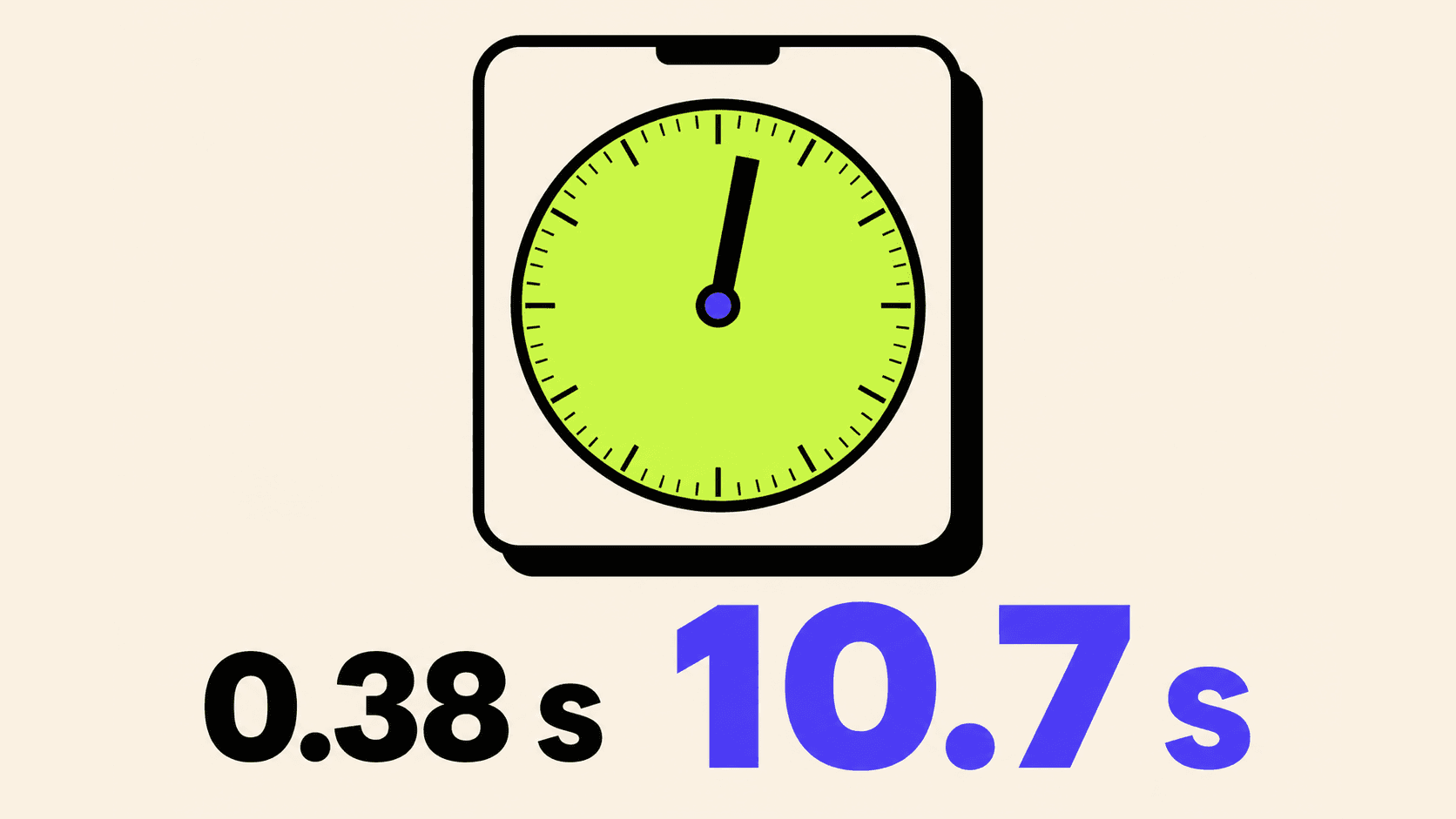
Here is where the factor of twenty-seven comes in.
The same twelve-run harness, same source, same input, on the simulator:
              cold ttft   warm ttft
device           1.15 s      0.38 s
simulator       15.74 s     10.70 s
The simulator is not a bit slower. It is slower by more than an order of magnitude, and slower in a way that would change what you build. Ten seconds of dead air before the first character means you need a progress screen, an explanatory message, probably a cancel button. Four hundred milliseconds means you need none of that.
My first guess was the simulator lacking a Neural Engine and falling back to the CPU. Then I ran the same code natively on the Mac. Around seven seconds. Faster than the simulator, nowhere near the phone, so the penalty is real but it is not the whole story and I do not yet know what is. That run also happened on a machine that was busy compiling at the time, so treat the exact figure as soft.
What I would trust is the gap between the device column and everything else. If you take one thing from this post: any latency number you get from a simulator is fiction, and publishing it as on-device performance is worse than publishing nothing.
The wall you will hit next
Paste something long, and you get exceededContextWindowSize.
The on-device model has a 4,096 token window, which is smaller than most people's mental model of "a context window" in 2026. A single medium-length article does not fit. I wrote about what that number actually means, and why token counts are not a property of text, in There Is No Such Thing as a Token Count.
Handling it properly means chunking, and chunking a summary well is not obvious, since summarising each chunk separately gives you a summary of summaries with all the connective tissue removed.
That is the next post, along with getting structured output instead of prose, so the summary can be three separate typed sentences rather than one string you have to parse.
What you have
An app that runs a language model with no network, tells the user something useful when it cannot, streams its answer, and reports its own latency. Around a hundred and fifty lines.
And a measured number for what it costs, which is the part you cannot get from a demo.
The whole project is at github.com/palKaran/summarise-anything if you would rather read it than type it.
New articles, straight to your inbox.
No spam, no filler — just new writing on iOS, the web, and AI when it ships. Unsubscribe anytime.
Keep reading
Your CPU Has More Cores Than Your Job Can Use
Some work splits cleanly across hundreds of cores. Other work is a chain of steps where every new step has to wait for the last one to finish.
ReadYour Password Isn’t as Random as You Think
Crack-time calculators measure the size of a theoretical password space—not how people actually choose passwords or how attackers search them.
Read